
Blank Invoice Template
Blank Invoice Template The free blank invoice template from Billed enables professionals like you to create client invoices quickly
No credit card required. Cancel anytime.
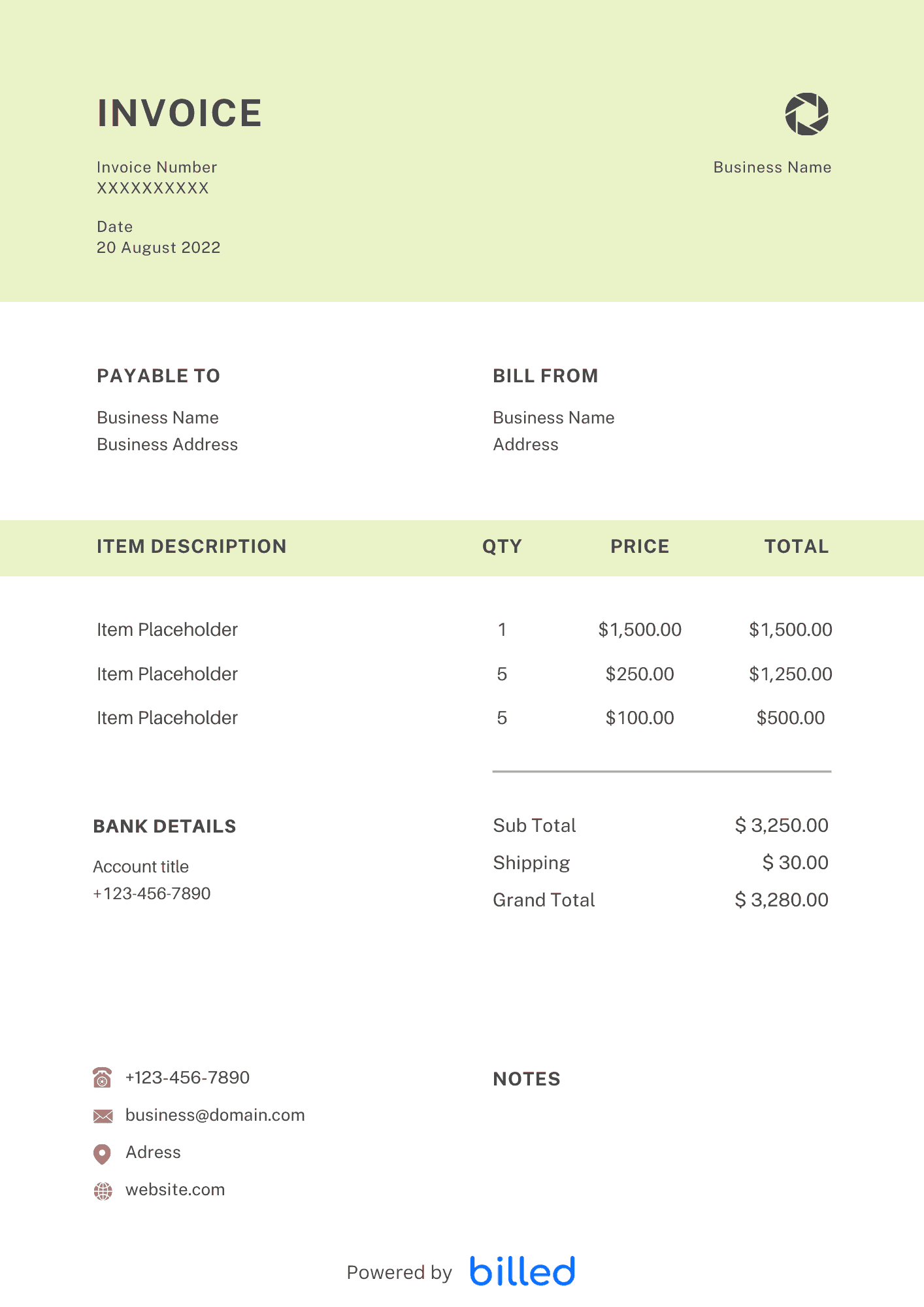
a Blank Invoice Template
Choose a template variation and download in your preferred format.
Create with Billed
Create with Billed
Get Your Free Blank Invoice Template
Creating invoices for your small business has become easier with Billed.
Then why spend more time on designing complicated and expensive invoice templates? With the blank invoice template from Billed, you can start sending professional and stylish invoices for free in a few minutes.
Our stylish and professional invoice templates are available in various formats.
What Is a Blank Invoice Used For?
A blank invoice is a document to request payment for goods or services a business provides. It serves as a formal transaction record between the seller and the buyer. Businesses typically use blank invoices to outline the sale details, including the itemized description of the goods or services, quantity, unit price, total amount due, payment terms, and applicable taxes or discounts. It provides a clear breakdown of the financial obligations, helping both parties maintain accurate records and facilitate timely payments.
Blank Invoicing for Small Businesses
Blank invoicing is essential for small businesses to ensure timely and accurate payment collection. Small businesses can create professional invoices tailored to their needs by utilizing a blank template. This helps them provide their clients with a clear breakdown of the goods or services rendered, prices, and payment terms.
Blank invoicing allows small businesses to maintain consistent and organized records of their transactions. It helps track outstanding payments, monitor cash flow, and facilitate financial analysis. Small businesses can easily generate invoices using a standardized template, reducing administrative burden and saving time.
Furthermore, blank invoicing enables small businesses to present a professional image to their clients. Customizing invoices with their company logo, colors, and branding elements adds a personal touch and strengthens brand recognition.
Key Elements of Blank Invoice
Here are the key elements typically found in a blank invoice:
Header: The header section contains your company’s name, logo, address, contact information, and any other relevant details, such as a website or email address.
Invoice Number: The invoice should have a unique identification number for easy reference and tracking purposes. The invoice number helps you and your client keep track of payments and correspondence.
Date: This is the date when the invoice is issued. It indicates the timing of the transaction and helps establish payment terms and due dates.
Bill To: This section includes the name, address, and contact details of the client or customer being billed. It ensures that the invoice is properly directed to the right recipient.
Description of Goods or Services: Provide a detailed description of the goods or services rendered. Include the quantity, unit price, and any applicable discounts or taxes.
Total Amount: Calculate and display the amount due for the goods or services. This should include any taxes or additional fees.
Payment Terms: Specify the payment terms, such as the due date, accepted payment methods, and any late payment penalties or discounts for early payment.
Additional Notes: Leave space for any additional notes or special instructions, such as return policies, warranties, or other terms and conditions.
Footer: Include a brief closing statement, such as a thank you message or a reminder of your contact information for any inquiries or concerns.
How to create an invoice from a Blank Invoice Template?
Here’s the step-by-step guide for creating an invoice from a blank invoice template:
Download the Template: Download the blank invoice template from Billed.
Add Company Details: Insert your company’s name, logo, address, cell number, email address, and any other relevant information at the top of the invoice. This information helps identify your business and provide contact details.
Enter Client Details: Add your billing client details. This includes the client’s name, address, and other necessary contact information. Ensure the client’s details are accurate.
Assign an Invoice Number: Generate a unique invoice number for this particular invoice. Display the invoice number prominently for easy reference and tracking purposes.
Invoice Issue and Due Date: Indicate when the invoice is issued and specify the payment due date or expiration date. This provides a clear timeline for the client to make the payment.
Line Items: List the services or products provided in separate line items. Include a description of each item, quantity, unit price, and subtotal for each line item. This breakdown helps the client understand the specifics of the invoice and ensures transparency.
Subtotals and Taxes: Calculate the subtotal by adding the line item totals. If applicable, include any taxes or additional charges. This information provides a clear overview of the costs involved in the invoice.
Total Amount: Calculate the amount due by adding the subtotal and any taxes or additional charges. Display this total prominently on the invoice to communicate the amount the client must pay.
Terms and Conditions: Specify the payment terms and conditions, such as accepted payment methods, payment deadlines, and any late payment penalties or early payment discounts. Include this information in a separate section or at the bottom of the invoice.
Save and Send: Save the completed invoice with an appropriate file name for easy organization and retrieval. If you send the invoice electronically, attach it to an email and send it to the client. Alternatively, you can print the invoice and mail it to the client if preferred.
Following these steps, you can quickly create an accurate and detailed invoice from a blank template, ensuring a professional and organized billing process.
Skip the Templates — Create Invoices Online
Why download templates when you can create professional invoices online with Billed? Customize, send, and get paid — all in one place.
No credit card required. Cancel anytime.
How To Create Your Invoice With Billed
Get started in minutes with three simple steps.
Sign Up Free
Create your free Billed account in seconds. No credit card required.
Customize Template
Choose and customize your invoice template with your business details.
Send & Get Paid
Send your professional invoice to clients and get paid faster.
Frequently Asked Questions
Common questions about this invoice template.
Related Articles
Learn more about creating professional invoices for your business.
Ready To Create Your Invoice?
Join thousands of businesses using Billed to create professional invoices and get paid faster.
No credit card required. Cancel anytime.