
Timesheets and Time Tracking
Log the time you and your team spend on tasks and projects, see it by day and by week, create timesheets, and invoice hourly projects from the time you tracked.
No credit card required. Cancel anytime.
Log time against tasks and projects
Log time for each task as you work, and see how much time goes into each project. Billed breaks your time down by day and by week, so a missing entry is easy to spot before you bill. Past entries also give you a record to estimate the next project from.
Invoice hourly projects from tracked time
Create an hourly rate project, set its hourly rate, and Billed tracks the charge for each task as you log it. From the project dashboard you can invoice one task or several at once. Example: a project at $85.00 an hour with 2.5 hours of discovery, 6 hours of design and 1.5 hours of revisions comes to 10 hours, or $850.00. Invoice the whole project, or bill only the revisions task for $127.50.
Create and export timesheets
Create timesheets from the time you and your team have tracked to see how the team is spending its time, and export them when a client or your accountant needs a copy. If you bill hours on a standalone invoice instead, start from the hourly invoice template.
See tracked time in your reports
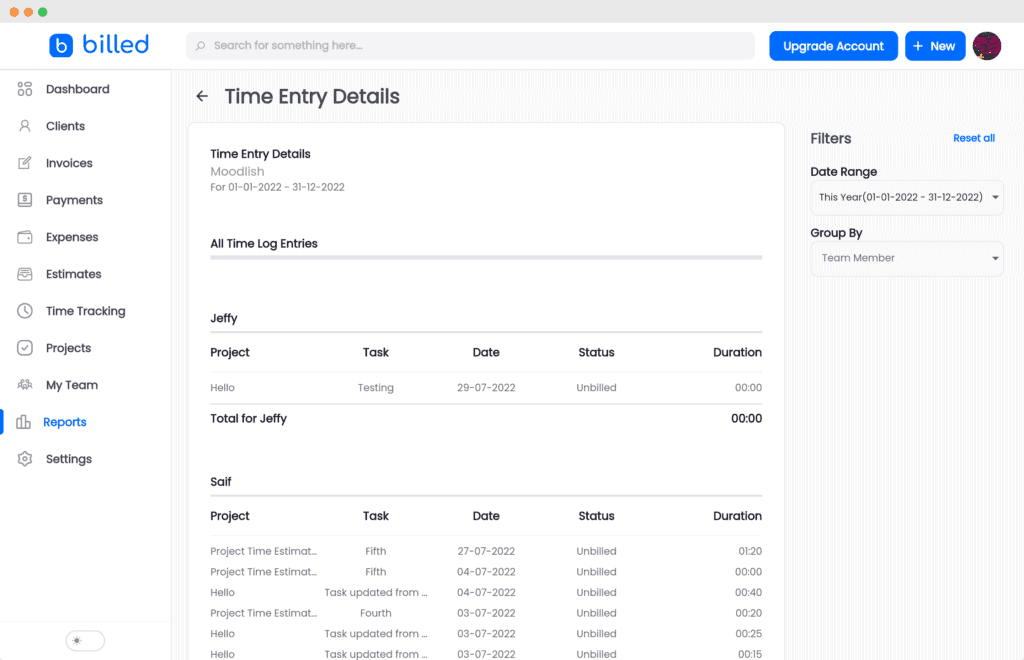
Billed's reports include a time tracking report. Like the other reports, it can be filtered by date range and exported.
Track time as a team
Invite teammates, accountants and contractors to your Billed account and grant them permissions, so the whole team tracks its time in one place. If you run more than one business in Billed, you can assign team members to specific businesses.
Set a rate that covers your costs
Before you set the hourly rate on a project, work out what an hour of your time needs to earn once costs and unbilled hours are counted.
Track time from any device
Billed works in a web browser, so you and your team can log time from a phone, a tablet or a computer.
FAQ
Most frequent questions and answers