
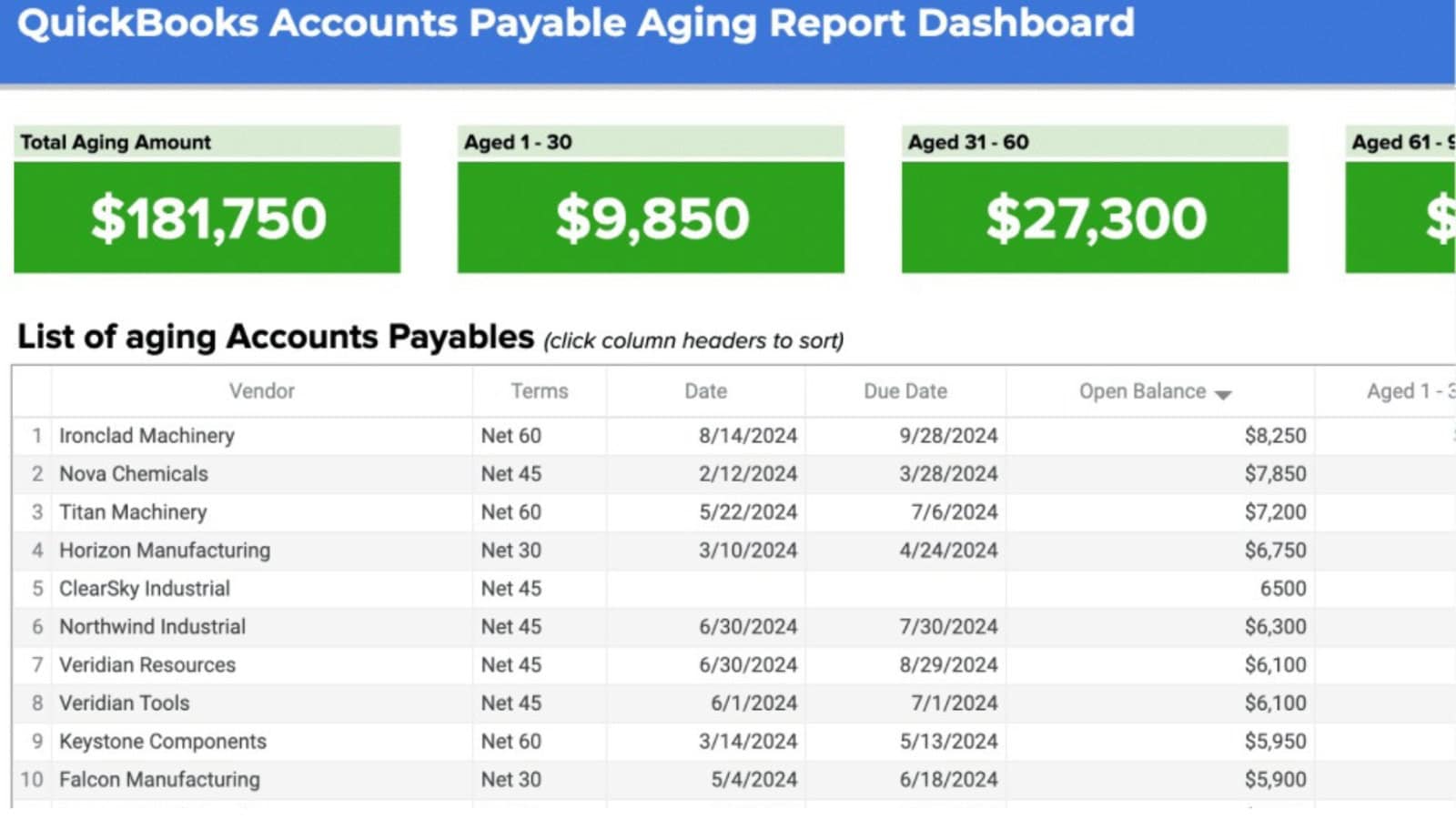
- Key Components of Account Payable Aging Report
- Purpose of Creating Account Payable Aging Report
An Account Payable Aging Report is a financial document that summarizes the details of a business’s debt obligations to suppliers, sorted by debt aging category.
Key Takeaways
- An Account Payable Aging Report is a financial document that summarizes the details of a business’s debt obligations to suppliers,...
- The following are the purposes of creating an account payable aging report.
- Here is a step-by-step guide to preparing a payable aging report.
By grouping debts by time since they were due, this report provides a clear picture of a business’s outstanding liabilities. For example, this report can show debts that are still within the normal time frame (0–30 days) to those that are long past due (more than 90 days).
The importance of this account payable aging report lies in its ability to help business people maintain their financial health and good relationships with suppliers.
Key Components of Account Payable Aging Report
To ensure this report can be used effectively, understanding its key components is essential.
The following are the main components that are usually found in a payable aging report:
1. Structure and Format
Account payable reports are generally prepared in a tabular format designed to present information systematically and easily read. Some important elements in the structure of this report include:
- Supplier Name: Identity of the supplier or vendor providing the goods or services.
- Invoice Number: A unique number for each invoice issued by the supplier.
- Invoice Date: The date when the invoice was issued.
- Due Date: The last date by which payment must be made without incurring a penalty.
- Amount Payable: The total balance owed for each invoice.
- Debt Aging Category: Grouping invoices by age or length of time since due (e.g., 0–30 days, 31–60 days, 61–90 days, and >90 days).
This format allows business owners to quickly identify debts that need to be addressed immediately, especially those that are past due.
2. Debt Age Category
Debt age grouping is the core of this report. This categories are usually segmented into several time ranges, such as:
- 0–30 Days: Debt that is still within the due date. Usually considered in normal condition.
- 31–60 Days: Debt that is past its initial maturity. Please pay attention to complete the payment immediately.
- 61–90 Days: Accounts payable that are starting to enter significant delays. This can impact relationships with suppliers.
- >90 Days: Debt that is very late and requires special action such as negotiation or payment restructuring.
This category provides clear priorities for payments based on urgency and risk.
3. Additional Information
In addition to the core elements, account payable aging reports are often supplemented with additional information to support decision making, such as:
- Payment Terms: Information regarding the agreed credit terms, for example, payment within 30 days (net 30) or discounts for early payment.
- Purchase Order (PO) Number: The order reference number associated with the invoice.
- Credit Memo/Note: A note about a refund or discount that has been received.
- Total Debt: The total accumulation of debt from all age categories.
This information not only helps in monitoring financial obligations but also ensures that payment records remain accurate and up-to-date.
Purpose of Creating Account Payable Aging Report
The following are the purposes of creating an account payable aging report.
1. Provide Accurate Information about Debt Obligations
The account payable aging report aims to provide a clear picture of the amount a business owes to suppliers and its maturity status.
With this information, management can understand the obligations that must be settled immediately and the debts that are still within the normal payment period.
2. Supports Cash Flow Planning
By looking at the amount of debt grouped by age category, business owners can predict future funding needs.
This allows companies to manage cash flow more effectively and avoid operational funding shortfalls.
3. Prevent Late Payments
Late payments can damage relationships with suppliers and incur additional costs in the form of penalties.
Accounts payable aging reports help identify invoices that are nearly due so companies can take immediate payment steps.
4. Ensure Compliance with Credit Terms
This report supports companies in complying with agreed credit terms with suppliers, such as early payment discounts or specific payment deadlines.
5. Support Audit and Reconciliation Process
Account payable reports help ensure that the amounts listed on the financial statements match the supplier’s records. This makes the audit process easier and improves the accuracy of financial data.
How to Create an Account Payable Aging Report
Here is a step-by-step guide to preparing a payable aging report.
Step 1: Collect Debt Data
Gather all relevant information related to accounts payable. The data required includes:
- Name of supplier or vendor.
- Invoice number.
- Invoice issue date.
- Invoice due date.
- Total amount of debt.
Make sure the data collected has been checked for accuracy to avoid errors in the report.
Step 2: Categorize Debt by Age
Group unpaid invoices by age or time since due. Typically, the categories used are:
- Current: Invoices not yet due.
- 0–30 Days Past Due: Invoices overdue by up to 30 days.
- 31–60 Days Past Due: Invoices overdue between 31 and 60 days.
- 61–90 Days Past Due: Invoices overdue between 31 and 60 days.
- >90 Days Past Due: Invoices that are extremely late in being paid.
This category provides a clear view of the level of urgency of each debt.
Step 3: Formatting the Report
Arrange the data into a table with relevant columns, such as:
- Supplier name.
- Invoice number.
- Invoice date.
- Due date.
- Debt age category.
- The amount of debt in each category.
- Total debt.
This format can be customized according to business needs, either in the form of detailed reports or summaries.
Account Payable Aging Report Analysis and Follow-up
Once the payable aging report is successfully compiled, you can easily find out the list of unpaid invoices. In addition, you can also analyze and compare the total amount of debt with the company’s financial condition so that you can develop a better payment strategy.
Here are the steps in analyzing and following up on payable aging reports to keep your business financially healthy.
1. Identify Payment Patterns
Examine reports to understand the company’s payment patterns to suppliers.
If there are consistently late payments to a particular supplier, evaluate whether this is due to internal issues, such as cash flow constraints, or due to inappropriate payment terms.
Discuss with suppliers to negotiate more flexible payment terms if necessary.
2. Identifying Errors and Inconsistencies
Next, make sure the report has been checked to detect any duplicate invoices that cause excessive debt recording.
Also, check if there are any invoices that have been paid but still appear in the debt list. This can cause errors in calculating the actual liabilities.
Negative balances in the report also need to be observed, as this could be an indication of a credit memo from a supplier due to returned goods or price corrections that have not been accounted for. This negative balance can occur if there is a refund from the supplier due to an unrecorded overpayment.
If any discrepancies like this are found, immediately make corrections in the system so that the report remains accurate and reliable in decision making.
3. Grouping and Prioritizing Payments
Based on the payable aging report, identify past due invoices and determine payment priorities. Invoices that are nearing their due date or that are long overdue should be settled immediately to avoid late fees and maintain good relationships with suppliers.
If the company’s financial condition does not allow it to pay all obligations at once, consider preparing a payment schedule based on urgency and negotiation with suppliers.
Account Payable Aging Report Example
By compiling data in a systematic tabular format, this report facilitates analysis and decision-making regarding payment priorities.
In this section, we will look at some examples of payable aging reports in summary and detailed formats.
1. Example of a Summary Report of Debt Age Based on Age Category
An example of this format displays the total debt owed to each supplier, grouped by age category.
Here is an example of a payable aging summary report:
| Vendor | At the moment | 0-30 Days | 31-60 Days | 61-90 Days | >90 Days | Out of Arrears |
|---|---|---|---|---|---|---|
| Vendor A | 10 million | 5 million | 0 | 0 | 0 | 15 million |
| Vendor B | 0 | 8 million | 12 million | 4 million | 6 million | 30 million |
| Vendor C | 3 million | 5 million | 3 million | 1 million | 0 | 12 million |
| Vendor D | 0 | 0 | 15 million | 10 million | 5 million | 30 million |
| Total | 13 million | 18 million | 30 million | 15 million | 11 million | 87 million |
Explanation:
- Current: Debts not yet due.
- 0-30 Days to >90 Days: Debts that are past due.
- Total Outstanding: Accumulation of all age categories for each supplier.
This summary report helps businesses identify suppliers with the largest amounts of debt and span of delays.
2. Example of a Detailed Account Payalbe Aging Report Complete with Invoice Details
This example of an account payable aging report format provides more in-depth information by displaying each invoice. This format is suitable for auditing or more in-depth analysis purposes.
Here is an example:
| No. | Suppliers | Invoice No. | Invoice Date | Due date | Age | Amount of Debt | Note |
|---|---|---|---|---|---|---|---|
| 1 | Vendor A | 001 | 01/01/’24 | 01/31/’24 | 0-30 Days | 5 million | Not yet paid |
| 2 | Vendor B | 002 | 12/15/’23 | 01/14/’24 | 31-60 Days | 12 million | Not yet paid |
| 3 | Vendor C | 003 | 11/20/’24 | 12/20/’24 | >90 Days | 6 million | Not yet paid |
| 4 | Vendor D | 004 | 12/01/’24 | 12/31/’24 | 61-90 Days | 10 million | Not yet |
| 5 | Vendor D | 005 | 01/01/’24 | 01/31/’24 | At the moment | 15 million | Not yet paid |
Explanation:
- Supplier and Invoice Number: Details about the supplier and related documents.
- Due Date: Payment deadline for each invoice.
- Age: Helps identify the level of debt delinquency.
- Description: Payment status, for example “Not Paid” or “Paid”.
Save Time and Stay on Top of Payables with Billed’s Automation Tools
Billed is here as an innovative solution that helps companies record and manage debt data in a more structured way.
With Billed, you can record all bills and payment obligations in one centralized platform, making recording more systematic and neat.
Each invoice from a supplier can be uploaded digitally and directly connected to the relevant supplier, so there are no more lost invoices.
Plus, you can easily monitor payment status—mark invoices as unpaid, in process, or paid—to keep everything organized.
Not only that, the payment automation feature allows you to schedule payments automatically according to agreements with suppliers.
With these conveniences, Billed helps you manage your debt more intelligently, efficiently, and without hassle. You may also consider using Agiled.app.
Related resources: Learn about invoice payment best practices and explore Billed's expense tracking to manage payables efficiently.