
Free Tool
Free Estimate Generator
Create professional estimates and quotes in minutes. Add your logo, line items, taxes, and terms — then turn an accepted estimate into an invoice with one click.
No credit card required. No sign-up needed.
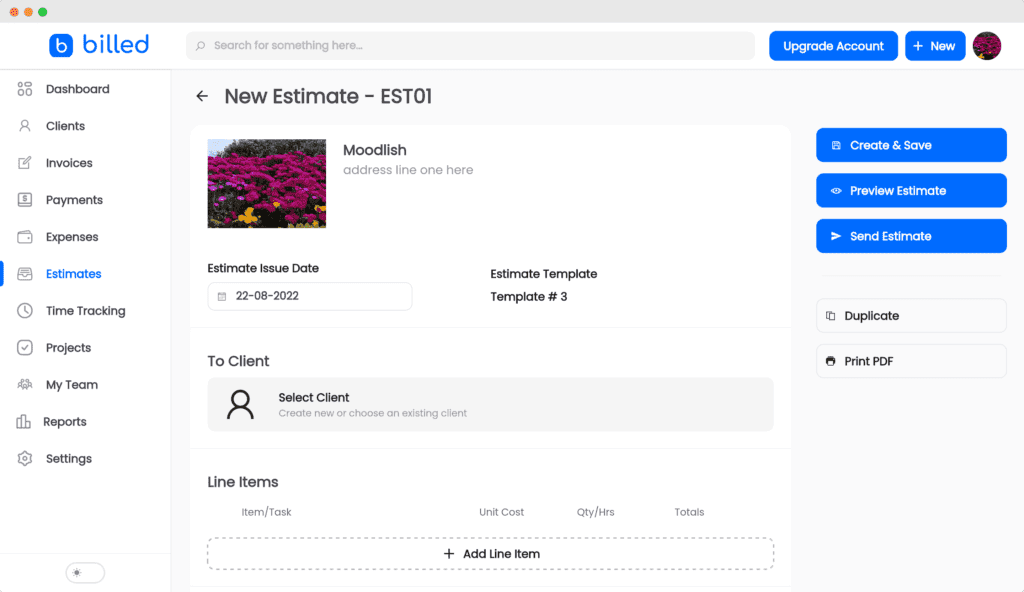
Key Takeaways
- Create and send professional estimates for free — add logo, line items, taxes, and terms.
- Convert an accepted estimate into an invoice in one click; line items and totals carry over.
- Send as a shareable link or PDF, and quote from your phone with the Billed app.
- Set an expiry date (commonly 14-30 days) to protect your pricing and nudge approval.
- When the estimate becomes an invoice, a Stripe or PayPal pay button lets the client pay right away.
Online Estimate & Quote Maker
Impress clients with professional estimates that set clear expectations before work begins. Add your logo, itemize services and materials, apply taxes, and set how long the quote stays valid — all in a clean, readable format.
The difference between Billed and a static template is what happens after the client says yes. Instead of re-typing the quote into a separate invoice, you convert the accepted estimate into an invoice in one click. The line items, totals, and client details carry over exactly, so there are no mismatched numbers and nothing to re-enter.
Save your services and client details once and reuse them on every future quote, so the next estimate takes a minute instead of an afternoon.
How to Create an Estimate
From blank page to sent quote in five steps.
Open the estimate maker
Start in Billed on desktop or mobile. Create an estimate without any cost or subscription required.
Choose a template
Pick a clean, professional estimate template that fits the way you quote work.
Add line items and terms
List the services or products, quantities, and rates. Set validity dates, taxes, and any conditions the client should agree to.
Brand it
Upload your logo and contact details so the quote reflects your business and builds trust before the client decides.
Send or download
Email the estimate, share a link, or download a PDF. When the client accepts, convert it to an invoice in one click.
What Goes on an Estimate
The fields that make a quote clear, professional, and easy to approve.
Your Business Details
Logo, business name, contact information, and address — auto-filled on every estimate once saved.
Client Details
The client's name, company, email, and address so the quote is addressed correctly.
Estimate Number
A unique, sequential number that identifies the quote and links it to the invoice it becomes.
Issue & Expiry Date
When the estimate was issued and how long the quoted prices remain valid.
Line Items
Services or products with descriptions, quantities, and unit rates, plus optional labor and material breakdowns.
Taxes & Discounts
Applicable tax rates and any discounts, calculated automatically into the total.
Total Estimate
The full quoted amount, clearly shown so the client knows the bottom line before approving.
Terms & Notes
Conditions, payment terms, or notes the client should review before accepting the quote.
Why Quote With Billed
Win the job, then bill for it without missing a beat.
Estimate-to-Invoice in One Click
When a client accepts, turn the estimate into an invoice instantly — the line items carry over, so the client sees consistent numbers from quote to bill.
Quote in Minutes
Save reusable services and client details so a professional estimate takes a minute, not an afternoon of formatting.
Win More Jobs
A clean, branded quote that arrives fast signals professionalism and helps you stand out against slower competitors.
Clear, Itemized Quotes
Break down labor, materials, and taxes so clients understand exactly what they are paying for and approve faster.
Reuse and Duplicate
Duplicate a past estimate for similar jobs and adjust the details, instead of starting from a blank page each time.
Quote From Anywhere
Create and send estimates from your phone on the Billed app, so you can quote a client while you are still on site.
Estimate generator vs. static templates
| Approach | Convert to invoice | Branding | Quote from phone | Cost |
|---|---|---|---|---|
| Billed estimate generator | One click, line items carry over | Logo + custom colors | Yes, iOS & Android | Free |
| Word / Excel template | Manual re-entry into a separate invoice | Manual formatting | No | Free |
| Static PDF tool | Manual re-entry | Limited | No | Free/paid |
Why estimate-to-invoice conversion matters. We traced the path from accepted quote to paid invoice. With a static template (Word, Excel, PDF), an accepted estimate has to be manually re-typed into a separate invoice — a step that introduces transcription errors and delay, and where clients sometimes notice numbers that do not match the quote they approved. Converting the same estimate into an invoice in one click removes the re-entry, keeps the figures identical, and shortens the gap between 'yes' and 'invoice sent.' The shorter that gap, the sooner the work gets paid.
When this isn't for you
If you only ever issue fixed-price quotes for identical products and never bill afterward, a one-off static template may be all you need — the value of this generator is in the workflow that connects the quote to an invoice and a payment. It is also not a construction takeoff or complex bid-estimating engine with assembly databases and cost catalogs; trades needing detailed quantity takeoffs should use dedicated estimating software for the build-up and Billed for the client-facing quote and billing. For freelancers, agencies, and service businesses that quote work and then bill for it, this is the right tool.
Frequently Asked Questions
From Estimate to Paid Invoice
Create a quote, win the job, and convert it to an invoice in one click. Billed handles estimates, invoicing, payments, and reminders in one place.
No credit card required. Cancel anytime.