
Services Rendered Invoice Template
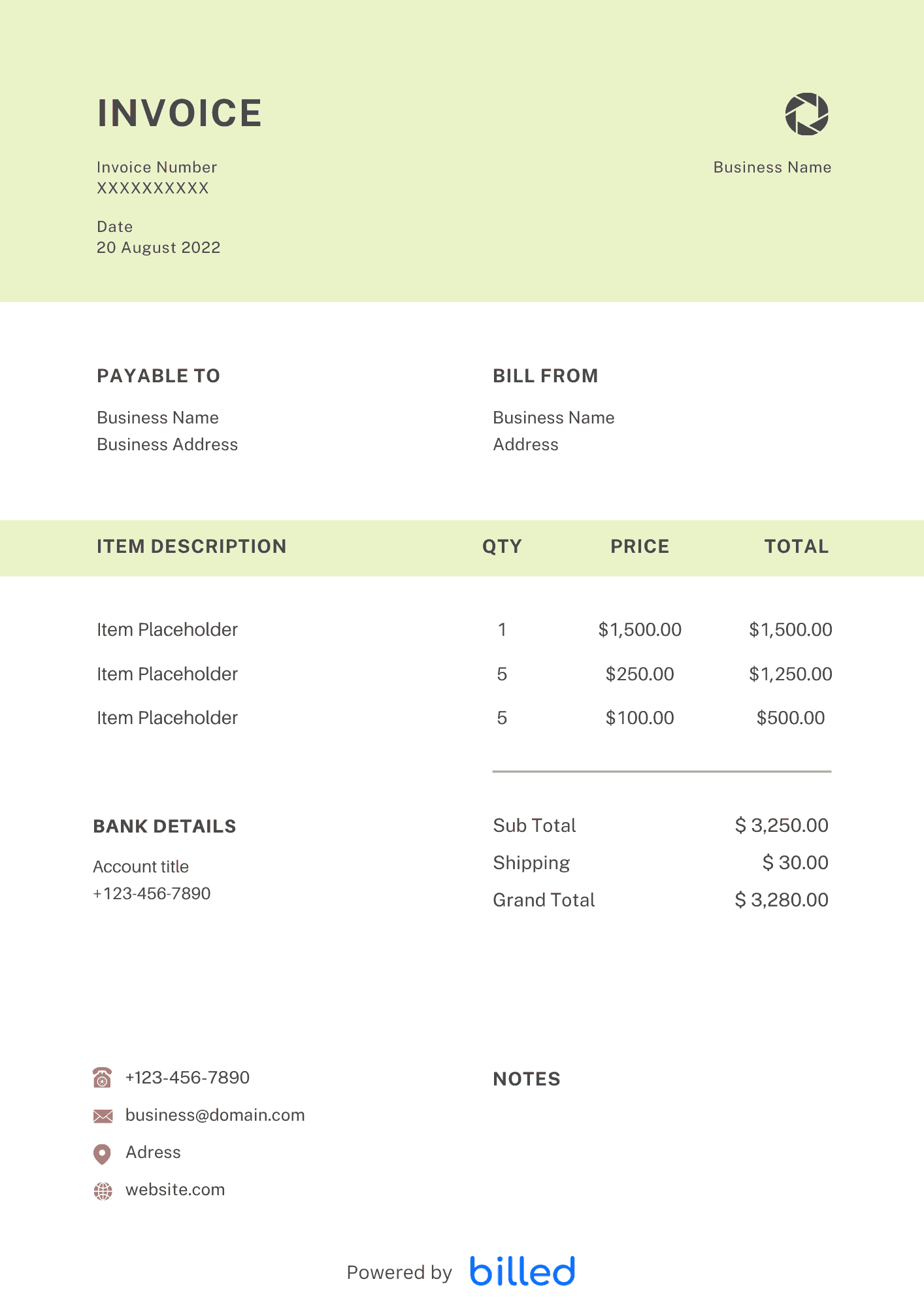
Services Rendered Invoice Template The services rendered invoice template that we offer to download here free of charge help you create legally secure invoices more quickly
No credit card required. Cancel anytime.
Key Features
Everything you need in a professional invoice template.
Services Rendered Invoice Template
Choose a template variation and download in your preferred format.
Create with Billed
Get Your Free Services Rendered Invoice Template
For business persons, the question arises of how they can guarantee fast, inexpensive, and smooth payment processes in that meet different customer needs and at the same time ensure their own profitability.
With the free services rendered invoice templates from Billed you can create branded and functional invoices in a few seconds.
Download our stylish and customizable invoice templates in your favorite formats like DOC, XLS, and . For more free templates visit our gallery.
When to send the services rendered invoice?
Sending the invoice at the perfect time is always helpful to get compensated timely and accurately.
You can send the invoice at the right time with the help of the following tips.
- If you are providing your specialized services on a small scale, it is always handy to invoice your client as soon as possible after the completion of the project.
- For the long-term project, it is better to request payment upfront.
- In the case of recurring customers, it is also a good idea to get paid on a weekly or monthly basis.
Why do you use services rendered invoice templates?
As a specialized services provider, you make sure to complete the work on time so you get compensated on time as well.
To cover all your billing issues, you need to send the perfect, detailed, and crystal-clear invoices to your clients and let them know precisely what services they are being charged.
If you want to send professional and customizable invoices to your clients, get started billing with Billed, and help your clients release your payments quickly without any confusion.
Handy tips for services rendered invoices
Without a professional and detailed invoice, it could be challenging to get paid immediately and ideally. Here are some main invoicing tips that help you create a professional and detailed invoice.
Numbered the invoice: It helps you to identify each and every invoice. Through invoice number, you can easily keep track of all invoices effortlessly.
Include a ‘payment due’ date: Including the payment due date in the invoice helps your client to know when you expect to get paid.
Include up-to-date contact information: After entering the contact information in the invoice, it is better to recheck it. Wrong contact details can cause the delay.
Accept a variety of payment methods: The flexibility in payment methods enables you to receive your payments as soon as possible.
What are the purposes of using Services Rendered Invoice?
Keeping track of all financial transactions is time consuming and tedious work. So it would be best if you used a powerful invoicing tool to make your job easy.
Start creating a professional-looking and well-organized invoice, it is an easy and straightforward way to manage all your financial transactions, and your small business needs to be in the online billing space.
Luckily, with the help of Billed, you can easily create professional and detailed services rendered in a minute. This invoice template empowers you to collect all your payments quickly and flawlessly.
Besides, it also enables you to keep track of each client’s account accurately, managing data and keeping track of payments received and due.
Types of Service Invoices
Check out the following types of e-commerce invoice:
Standard Invoice: The most basic invoice. You can issue this invoice to bill your clients for all types of projects.
Automatic Invoice: The best option if you want to bill your clients for an agreed amount for your services. This invoice is normally issued on a monthly basis.
Credit Invoice: A credit invoice comes into action when your clients want you to refund their payments.
Debit Invoice: This is used to notify additional charges in the total amount owed to a business.
Mixed Invoice: It includes all the details of both debit and credit transactions.
How to Create a Services Rendered Invoice?
If you want to create an ideal and perfect invoice in a few seconds, follow the given steps, and create an outstanding invoice for your business.
- Download the services rendered invoice template from Billed for free
- Add your or business name along with the contact details
- Add your business logo in different fonts and colors
- Add your client’s name and contact details
- Add the invoice issuance date
- Add the payment due date
- Enter the unique invoice number
- Add the list of your services rendered and cost for each
- Calculate the total cost of the project, including tax, etc.
- Add payment terms and conditions
- Add privacy policy if any
- Save
- Send via Billed or email, etc.
With our stylish and customizable services rendered invoice template, you can quickly fill it out according to the project or the job. This will help you bill your clients in seconds.
Skip the Templates — Create Invoices Online
Why download templates when you can create professional invoices online with Billed? Customize, send, and get paid — all in one place.
No credit card required. Cancel anytime.
How To Create Your Invoice With Billed
Get started in minutes with three simple steps.
Sign Up Free
Create your free Billed account in seconds. No credit card required.
Customize Template
Choose and customize your invoice template with your business details.
Send & Get Paid
Send your professional invoice to clients and get paid faster.
Frequently Asked Questions
Common questions about this invoice template.
Related Templates
Explore more templates for your business.
Related Articles
Learn more about creating professional invoices for your business.
Ready To Create Your Invoice?
Join thousands of businesses using Billed to create professional invoices and get paid faster.
No credit card required. Cancel anytime.